> For the complete documentation index, see [llms.txt](https://docs.zero.inc/llms.txt). Markdown versions of documentation pages are available by appending `.md` to page URLs; this page is available as [Markdown](https://docs.zero.inc/getting-started/key-concepts/views.md).
# Views
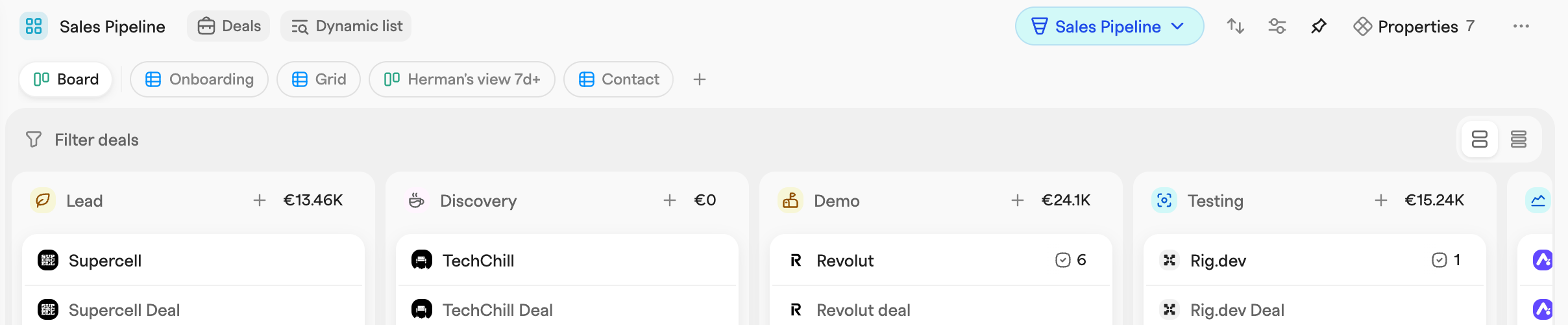
A list decides which records are included. A view decides how you look at them — and a list can have as many as you need, shown as pills at the top. Click a pill to switch, drag to reorder.
## Layouts
Every view is either a **Grid** — a spreadsheet-style table — or a **Board**, a kanban of cards in columns. A Board needs a **Group items by** rule to define its columns (for deals this defaults to the stage). You can switch a view between the two at any time from the **Options** menu.
## What a view saves
* **Filters** — changes in the filter bar apply immediately but are temporary. **Save for team** stores them on the view for everyone.
* **Grouping** — **Group by** in **Options** splits records into sections; a Board uses the same property for its columns. **Show N/A** and **Show empty** control whether valueless and empty sections appear, and **Clear grouping** switches it off.
* **Properties** — which properties appear as columns. **Add a property** creates one that does not exist yet.
* **Sorting** — the **Order by** menu.
* **Highlights** — **Add list highlight** in **Options** colors the records matching a condition.
Because each view keeps its own settings, a single deal list can carry a pipeline Board and a focused outreach Grid at the same time.
## Sub-grouping and collapsing
Once a view is grouped, **Group by** offers a second **Sub-group by** property. A Grid then nests sub-sections with their own headers and counts; a Board splits into swimlanes, one row of columns per sub-group.
Every group, sub-group, column and swimlane collapses from its header, which is how you fold away the parts of a big list you are not working on today. Collapsing is personal and is not saved for the team. Boards also have a **Column width** setting in **Options**.
## Creating and managing views
The **+** next to the view pills opens **Create new view**: name it, pick what it tracks, choose Grid or Board. The first view created for a list becomes its default.
Right-click a pill for **Edit view** (rename or change layout — what it tracks is fixed after creation), **Duplicate view**, **Make default** and **Delete view**. The default view cannot be deleted.
## Views never change membership
Every view of a list shows the same underlying records, so filtering a record out of one view does nothing to the others. **Remove from the list**, on the other hand, takes the record out of the list itself and so out of every view of it.
---
# Agent Instructions
This documentation is published with GitBook. GitBook is the documentation platform designed so that both humans and AI agents can read, navigate, and reason over technical content effectively. Learn more at gitbook.com.
## Querying This Documentation
If you need additional information that is not directly available in this page, you can query the documentation dynamically by asking a question.
Perform an HTTP GET request on the current page URL with the `ask` query parameter, and the optional `goal` query parameter:
```
GET https://docs.zero.inc/getting-started/key-concepts/views.md?ask=&goal=
```
`ask` is the immediate question: it should be specific, self-contained, and written in natural language.
`goal` is optional and describes the broader end goal you are ultimately trying to accomplish on behalf of the user. GitBook uses it to tailor the answer towards what is most useful for that goal.
The response will contain a direct answer to the question and relevant excerpts and sources from the documentation.
Use this mechanism when the answer is not explicitly present in the current page, you need clarification or additional context, or you want to retrieve related documentation sections.