> For the complete documentation index, see [llms.txt](https://docs.zero.inc/llms.txt). Markdown versions of documentation pages are available by appending `.md` to page URLs; this page is available as [Markdown](https://docs.zero.inc/settings/integrations.md).
# Integrations
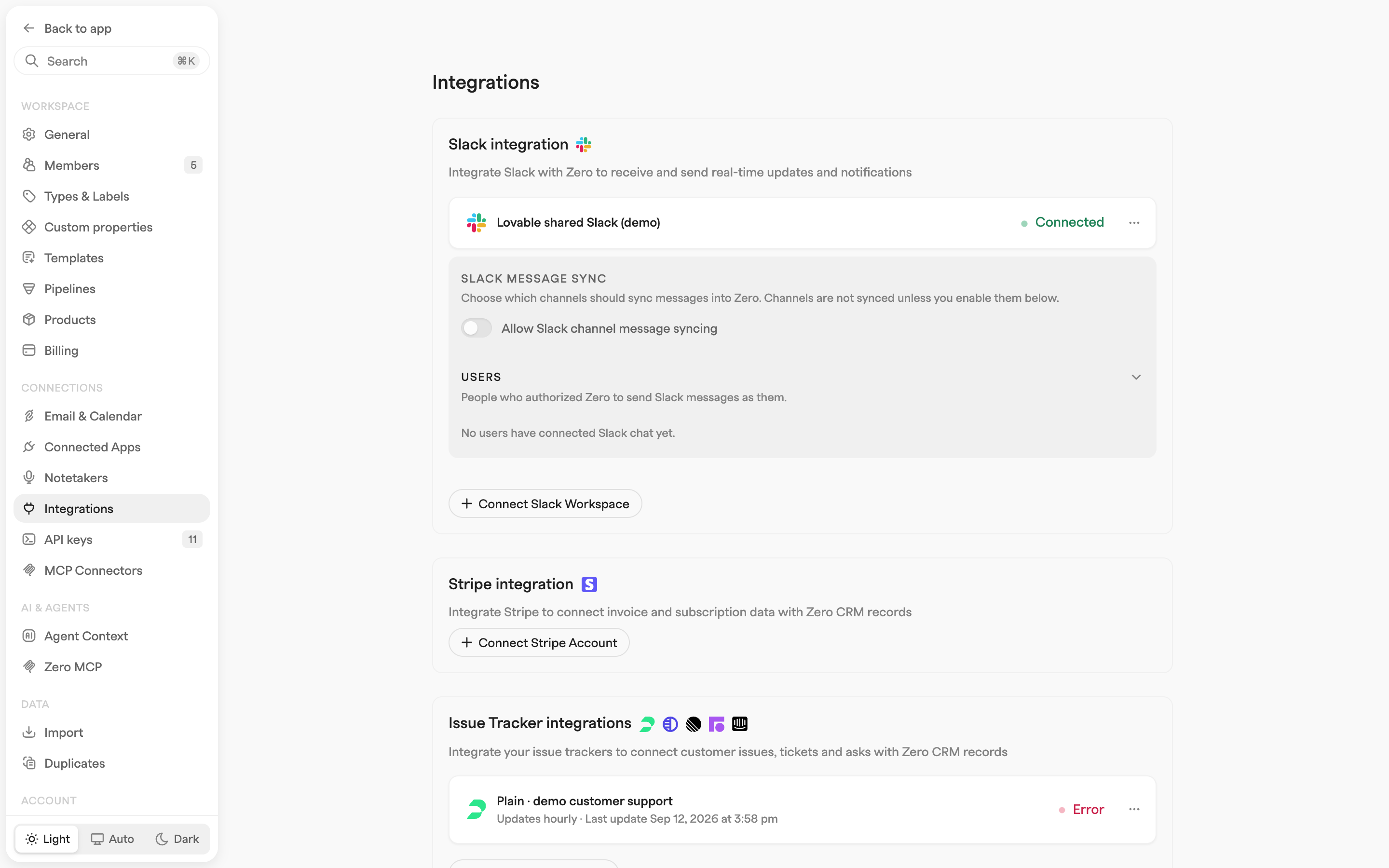
Half of what you know about a customer is in some other tool: what they pay you, what they've complained about, whether they're using the product. Integrations pull that back onto the CRM record, so the account page answers questions without you opening five tabs.
Most are connected once per workspace in **Settings → Connections → Integrations**. A few are per user or configured inside an agent — those are called out below.
## Workspace integrations
Connected once, by an admin, in **Settings → Connections → Integrations**:
| Integration | What it syncs | Connection |
| ---------------------------------------------------------------------------------------------------------------------------------------------------------------------------------------------------------------------------------------- | ---------------------------------------------------------------------------------------- | ------------------------------------------------------------------------------------------------------------- |
| [Slack](/settings/integrations/slack.md) | Notifications to channels, chat with Zero from Slack, customer-channel conversation sync | OAuth (**Connect Slack Workspace**); each user also connects their own Slack account under **Connected Apps** |
| [Stripe](/settings/integrations/stripe.md) | Customers, invoices, and subscriptions, matched to companies | Stripe secret key (`sk_live_...` or `sk_test_...`) with read access to Customers, Invoices, Subscriptions |
| Issue trackers: [Plain](/settings/integrations/plain.md), [Pylon](/settings/integrations/pylon.md), [Linear](/settings/integrations/linear.md), [Front](/settings/integrations/front.md), [Intercom](/settings/integrations/intercom.md) | Customer issues, tickets, and asks, linked to CRM records; updates hourly | Provider API key or token |
| Events: [Luma](/settings/integrations/luma.md) | Event RSVPs and attendance, linked to contacts; updates hourly | Calendar-scoped Luma API key (requires Luma Plus) |
| Analytics: [PostHog](/settings/integrations/posthog.md) | Product usage events, mapped to companies; updates every 4 hours | Personal API key with Query read scope, plus region (US/EU) and project ID |
Each shows its status — **Connected**, **Syncing** or **Error** — and when it last updated, with a manual sync in its `⋯` menu.
## LinkedIn
[LinkedIn](/settings/integrations/linkedin.md) runs through Zero's Chrome extension and is connected per user in **Settings → Connections → Connected Apps → LinkedIn** rather than in workspace settings. It syncs your messages and connections into Zero, and lets you save contacts and companies straight from a LinkedIn profile.
## WhatsApp
Also per user, in **Settings → Connections → Connected Apps → WhatsApp**: **Connect WhatsApp**, then scan the QR code from **Settings → Linked devices** in WhatsApp, and Zero joins as a linked device.
Because WhatsApp is personal as well as professional, syncing is opt-in per chat. Zero first lists your groups and direct chats and matches the people in them to your contacts, storing no message content. Under **Matched Conversations** you then pick, per chat, **Don't sync**, **New messages only** or **Available history**, and **Message visibility** decides whether new conversations are **Public** to the workspace or **Private** to you.
Synced conversations show on the activity feed of the matched contact and company. The same page disconnects the account or deletes all synced WhatsApp data.
## Outreach tools
Apollo, Instantly, Loops and Resend are connected inside agent actions rather than in settings. **Add to Apollo**, **Add to Instantly**, **Add to Loops** and **Add to Resend** push contacts into your outreach lists and campaigns, each holding its own API key. See [Outreach tools](/settings/integrations/outreach-tools.md).
## Related connections
* **Meeting notetakers** — Circleback, Fathom, Fireflies.ai, Granola, Notion, Wispr Flow, Garba, and Jamie sync meeting notes and transcripts into your workspace, connected per user in **Settings → Connections → Notetakers**. See [Call Recorders](/settings/call-recorders.md).
* **Email and calendar** — your Google or Outlook mailbox and calendar are connected per user in **Settings → Connections → Email & Calendar**. See [Mailbox Settings](/settings/mailbox-settings.md) and [Calendar Settings](/settings/mailbox-settings/calendar-settings.md).
* **MCP and API** — connect AI agents and your own code to Zero via [MCP](/developers/mcp.md) and the [API](/developers/api/introduction.md).
---
# Agent Instructions
This documentation is published with GitBook. GitBook is the documentation platform designed so that both humans and AI agents can read, navigate, and reason over technical content effectively. Learn more at gitbook.com.
## Querying This Documentation
If you need additional information that is not directly available in this page, you can query the documentation by asking a question.
Perform an HTTP GET request on the following URL with the `ask` and `goal` query parameters:
```
GET https://docs.zero.inc/settings/integrations.md?ask=&goal=
```
`ask` is the immediate question: it should be specific, self-contained, and written in natural language.
`goal` is what the user is ultimately trying to achieve, the reason they need the answer. Sharing it helps GitBook give you a better, more relevant answer. A goal is most helpful when it describes the outcome the user wants rather than restating the question. For example, with `ask=how do I create an API token`, a goal like `automate deployments from our CI pipeline` lets GitBook tailor the answer to that use case.
The response will contain a direct answer to the question and relevant excerpts and sources from the documentation.
Use this mechanism when the answer is not explicitly present in the current page, you need clarification or additional context, or you want to retrieve related documentation sections.