> For the complete documentation index, see [llms.txt](https://docs.zero.inc/llms.txt). Markdown versions of documentation pages are available by appending `.md` to page URLs; this page is available as [Markdown](https://docs.zero.inc/settings/integrations/outreach-tools.md).
# Outreach tools
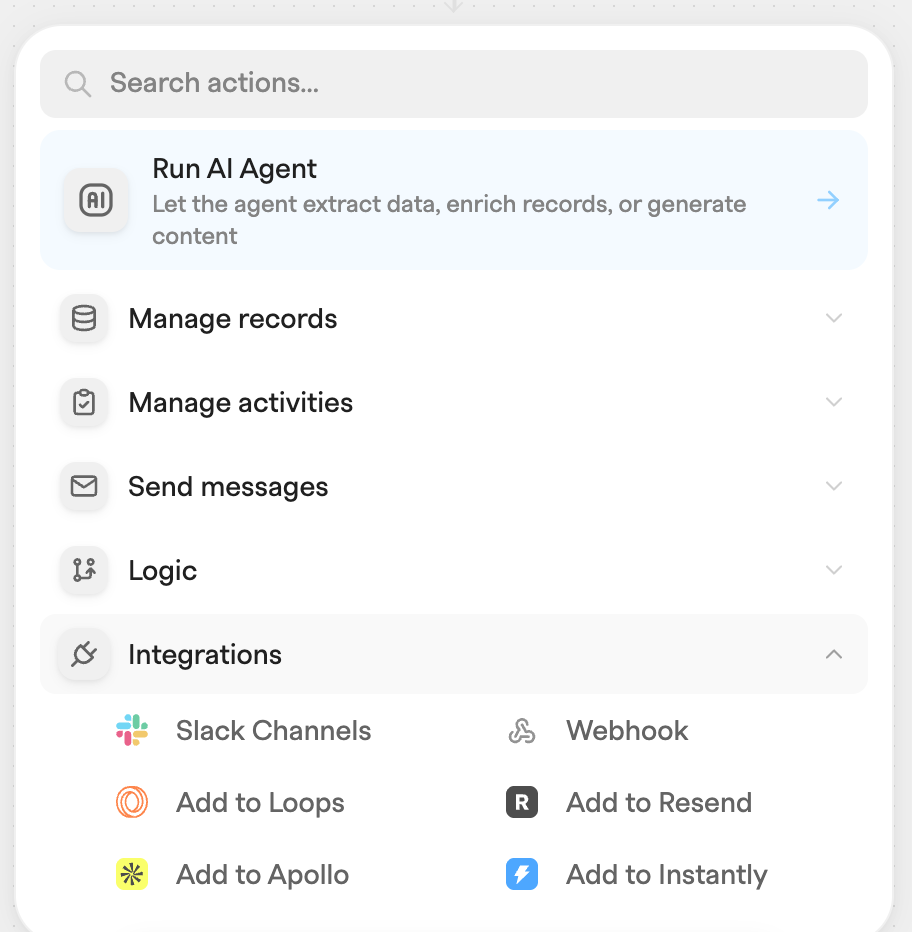
If your outbound already runs somewhere else, you don't have to move it — you can have Zero feed it. Four agent actions push contacts out: **Add to Loops**, **Add to Resend**, **Add to Apollo** and **Add to Instantly**.
These are configured inside the action rather than in **Settings → Connections → Integrations**. Each action holds its own provider API key, and pasting one loads that provider's lists, audiences, campaigns or sequences into the action's dropdowns — which also means different agents can use different provider accounts.
## Adding an outreach action
1. Open **Agents** from the sidebar and click **New agent** (or edit an existing agent).
2. Add an action and pick the tool from the **Integrations** category.
3. Paste the provider's API key into the action. Zero validates the key and fetches the selectable options (lists, audiences, campaigns, sequences).
4. Fill in the contact fields. Every text field accepts dynamic variables (press `{`), so you can map values from the trigger record or from previous actions — for example the contact's name and email.
{% hint style="info" %}
**Unsubscribe protection**: the **Add to Loops**, **Add to Resend**, and **Add to Instantly** actions refuse to run if a contact in your workspace with the target email address is unsubscribed from all messaging. The action fails with an error instead of syncing the contact.
{% endhint %}
## Add to Loops
Creates or updates a contact in [Loops](https://loops.so/) and subscribes it to the mailing lists you select.
| Field | Behavior |
| ------------------------- | ---------------------------------------------------------------------------------------------------------------------------------------------------------------- |
| **Loops API Key** | A Loops API key (32 lowercase alphanumeric characters). Loads your Loops lists and contact properties. |
| **Lists (optional)** | Multi-select of your Loops mailing lists. The contact is subscribed to every selected list. |
| **Email address** | The contact's email. Trimmed and lowercased before sending. |
| **Name** | Split at the first space into Loops' `firstName` and `lastName`. |
| **Additional properties** | Optional rows mapping your Loops contact properties to values. Click **Add contact property**, pick a property, and set its value (dynamic variables supported). |
The action upserts the contact in Loops (existing contacts are updated, new ones created) and sets the contact's `source` to `Zero`.
## Add to Resend
Adds a contact to a [Resend](https://resend.com/) audience.
| Field | Behavior |
| ------------------ | --------------------------------------------------------------------------------------------- |
| **Resend API Key** | A Resend API key (starts with `re_`). Loads your Resend audiences. |
| **Audience** | The audience the contact is added to. Required — the action fails without one. |
| **Email address** | Trimmed, lowercased, and validated; the action fails on an invalid email. |
| **Name** | Split into first name and last name (everything after the first space becomes the last name). |
If Resend rate-limits the request, Zero automatically retries up to 3 times, honoring Resend's `Retry-After` header (waiting at most 30 seconds per retry).
## Add to Apollo
Creates or updates a contact in [Apollo](https://apollo.io/), adds it to lists, and enrolls it in sequences.
| Field | Behavior |
| ----------------------------------- | ------------------------------------------------------------------------------------------------------------ |
| **Apollo API Key (Master API Key)** | Must be an Apollo **Master API key**. Loads your Apollo lists, sequences, and sending email accounts. |
| **Name** | Split at the first space into first and last name. |
| **Email address** | Lowercased. Used to look up whether the contact already exists in Apollo. |
| **Title** | Optional job title. |
| **Phone Number** | Optional direct phone. |
| **Company Name** | Optional organization name. |
| **Company Website URL** | Optional website URL. |
| **Add to Lists** | Multi-select of your Apollo contact lists (each shows its contact count). |
| **Add to Sequences** | Multi-select of your Apollo sequences (each shows Active/Inactive and its step count; up to 100 are listed). |
| **Sending email account** | The Apollo email account that sends the sequence emails. |
The action first searches Apollo for a contact with the email address:
* **Contact exists** — Zero only adds the missing lists to the existing contact; its other fields are left untouched.
* **Contact does not exist** — Zero creates the contact with the fields above and the selected lists.
The contact is then added to each selected sequence, sending from the chosen email account.
See Apollo's docs for creating a Master API key: .
## Add to Instantly
Creates a lead in [Instantly](https://instantly.ai/) and optionally assigns it to a campaign.
| Field | Behavior |
| ------------------------------ | --------------------------------------------------------------- |
| **Instantly API Key** | An Instantly API key. Loads your Instantly campaigns. |
| **Name** | Split at the first space into first and last name. |
| **Email address** | The lead's email. |
| **Phone Number** | Optional phone. |
| **Company Name** | Optional company name. |
| **Company Website URL** | Optional website. |
| **Personalization (optional)** | Optional personalization text stored on the lead. |
| **Add to Campaign (optional)** | Campaign the lead is added to (up to 100 campaigns are listed). |
If Instantly rejects the request, the action fails with Instantly's error message.
---
# Agent Instructions
This documentation is published with GitBook. GitBook is the documentation platform designed so that both humans and AI agents can read, navigate, and reason over technical content effectively. Learn more at gitbook.com.
## Querying This Documentation
If you need additional information that is not directly available in this page, you can query the documentation by asking a question.
Perform an HTTP GET request on the following URL with the `ask` and `goal` query parameters:
```
GET https://docs.zero.inc/settings/integrations/outreach-tools.md?ask=&goal=
```
`ask` is the immediate question: it should be specific, self-contained, and written in natural language.
`goal` is what the user is ultimately trying to achieve, the reason they need the answer. Sharing it helps GitBook give you a better, more relevant answer. A goal is most helpful when it describes the outcome the user wants rather than restating the question. For example, with `ask=how do I create an API token`, a goal like `automate deployments from our CI pipeline` lets GitBook tailor the answer to that use case.
The response will contain a direct answer to the question and relevant excerpts and sources from the documentation.
Use this mechanism when the answer is not explicitly present in the current page, you need clarification or additional context, or you want to retrieve related documentation sections.