> For the complete documentation index, see [llms.txt](https://docs.zero.inc/llms.txt). Markdown versions of documentation pages are available by appending `.md` to page URLs; this page is available as [Markdown](https://docs.zero.inc/settings/settings.md).
# Settings overview
Settings covers three different jobs: shaping the workspace for how your team works, connecting the outside tools Zero pulls data from, and looking after your own account. This page is the map — each entry links to the page that explains it.
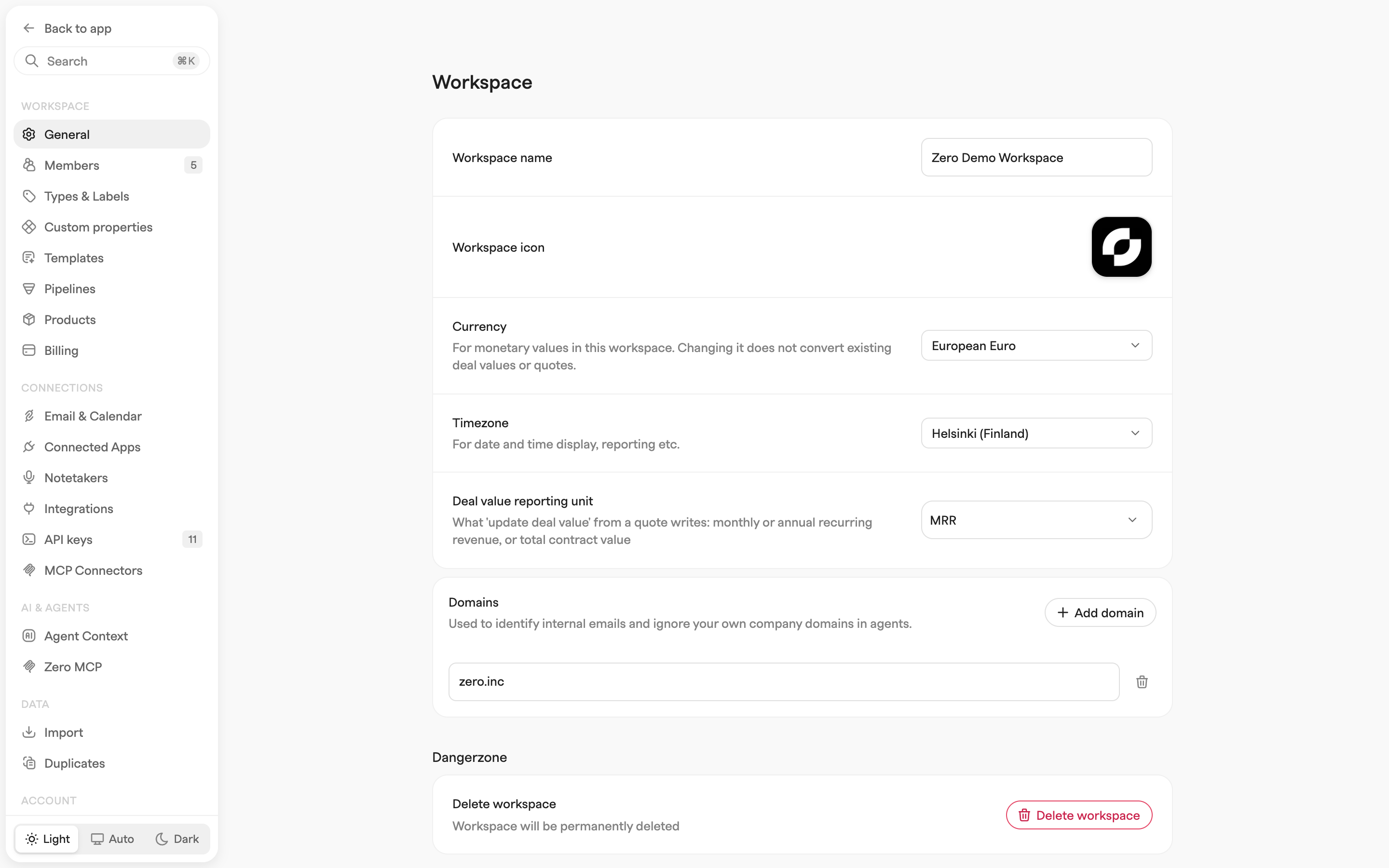
Click your workspace name in the top-left corner of the sidebar and choose **Workspace Settings** (admins) or **Settings**; clicking your own name at the top of that menu goes to your **Profile** instead. **Back to app** returns you to where you were, and **Search** (⌘K) jumps to a settings page by name.
The **Workspace** and **Data** sections, plus a few individual entries, are admin-only.
## Workspace
Admins only.
* **General** — workspace name and icon, currency, timezone, the unit used for deal value reporting, and your company's domains. Also where a workspace is removed for all members. Workspace data is retained; this action cannot be undone in the app. See [General & Domains](/settings/domain-settings.md).
* **Members** — invite teammates, manage each member's role, and review pending invites. See [Members](/settings/members.md).
* **Types & Labels** — custom activity types, contact types, email labels, and meeting labels used across the workspace. See [Types & Labels](/settings/types-and-labels.md).
* **Custom properties** — define custom properties on companies, contacts, and deals. See [Custom Properties](/settings/custom-properties.md).
* **Templates** — reusable blocks you insert by typing `/` in a note or an email. See [Templates](/settings/templates.md).
* **Pipelines** — one per sales motion or customer journey, with their stages. See [Pipelines](/settings/pipeline-stages.md).
* **Products** — the catalog of what you sell, with prices, used when building quotes on deals. See [Products & Quotes](/tracking-context/products-and-quotes.md).
* **Billing** — your workspace's plan and seats.
## Connections
* **Email & Calendar** — one Google or Outlook connection syncs both. A warning icon here means an account needs re-authorizing. See [Email & Calendar](/settings/mailbox-settings.md) and [Calendar Settings](/settings/mailbox-settings/calendar-settings.md).
* **Connected Apps** — your personal **LinkedIn**, **Slack** and **WhatsApp** accounts. The Zero Chrome extension is set up here too, on the **LinkedIn** tab. See [LinkedIn](/settings/integrations/linkedin.md).
* **Notetakers** — so call recordings and transcripts land on the right records. See [Notetakers](/settings/call-recorders.md).
* **Integrations** (admins only) — Slack, Stripe, issue trackers, event platforms and analytics, connected for the whole workspace. See [Integrations](/settings/integrations.md).
* **API keys** — your workspace ID and personal API keys for the Zero API. See [Introduction](/developers/api/introduction.md).
* **MCP Connectors** (admins only) — any third-party tool with an MCP server, whose tools then become available to Chat, agents and AI properties. See [MCP Connectors](/settings/mcp-connectors.md).
## AI & Agents
* **Agent Context** — background information your agents can read, so they decide the way you would. See [Agent Context](/settings/ai-contexts.md).
* **Zero MCP** — your personal connection URL and the tools it exposes, for pointing an AI assistant at Zero. See [MCP](/developers/mcp.md).
## Data
Admins only.
* **Import** — HubSpot, Attio, Pipedrive, Affinity or CSV, plus any active syncs. See [Data Import](/getting-started/data-import.md).
* **Duplicates** — find and merge duplicate records. See [Duplicates](/settings/merging-duplicates.md).
## Account
* **Profile** — your display name, email address, avatar, and preferred time format.
* **Security** — change your password, set up two-factor authentication, and review active sessions. See [Security](/settings/security.md).
The theme switch at the bottom of the settings sidebar moves the app between **Light**, **Auto** and **Dark**.
---
# Agent Instructions
This documentation is published with GitBook. GitBook is the documentation platform designed so that both humans and AI agents can read, navigate, and reason over technical content effectively. Learn more at gitbook.com.
## Querying This Documentation
If you need additional information that is not directly available in this page, you can query the documentation by asking a question.
Perform an HTTP GET request on the following URL with the `ask` and `goal` query parameters:
```
GET https://docs.zero.inc/settings/settings.md?ask=&goal=
```
`ask` is the immediate question: it should be specific, self-contained, and written in natural language.
`goal` is what the user is ultimately trying to achieve, the reason they need the answer. Sharing it helps GitBook give you a better, more relevant answer. A goal is most helpful when it describes the outcome the user wants rather than restating the question. For example, with `ask=how do I create an API token`, a goal like `automate deployments from our CI pipeline` lets GitBook tailor the answer to that use case.
The response will contain a direct answer to the question and relevant excerpts and sources from the documentation.
Use this mechanism when the answer is not explicitly present in the current page, you need clarification or additional context, or you want to retrieve related documentation sections.